
These instruction applies to the following products:
- Animator – Boy with kite
- Animator – Flag
- Animator – Fly fisherman
- Animator – Big foot
- Animator – Outhouse HO gauge
Units that do not have an SD card store all the files on the raspberry pi pico board. This board is set to read only. To set it to a writable USB drive you will need to change the boot.py file using Thonny. Thonny can be downloaded here. https://thonny.org/
Once thonny is installed. Plug in your animator using a USB A Male to Micro USB cable. It will boot up like normal and say “animations are active”.
Open up thonny and under the
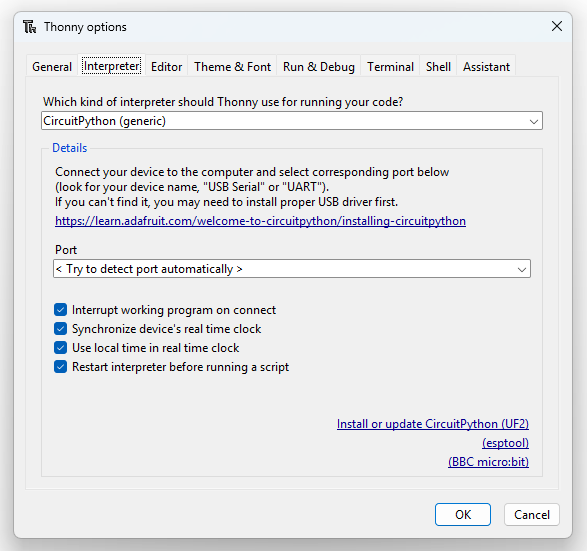
Run/Configure Interpreter and you will see the screen below. Choose CircuitPython (generic) for the interpreter to use and press OK.
Once you have done that successfully it will connect to your Raspberry Pi Pico board and following screen shall display.
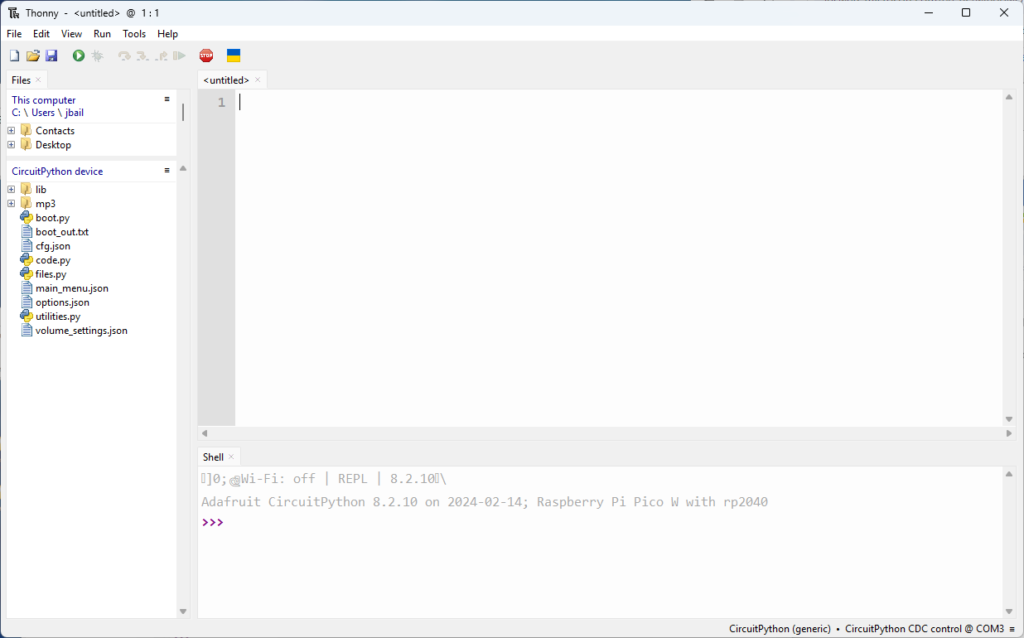
Open the boot.py file and comment out the storage line as show below. In python you comment out a line using the “#” sign. Save the file.

Next unplug the usb cable from your computer and the pico will reboot and be writable. Next delete all the files on the pico and replace them with the ones from the zip drive. Once copied unplug the pico again and it will reboot in read only mode.